Protect Your Domain from Spoofing Using SPF, DKIM, and DMARC
Protect Your Domain, Email remains one of the most important communication tools for businesses, but it is also one of the most targeted channels for cyber threats. One of the most common attacks is spoofing, where attackers send emails that appear to come from your domain. These fake emails can damage your brand reputation, reduce customer trust, and cause serious financial loss.

What is Email Spoofing?
Email marketing spoofing occurs when someone sends an email using your domain name without authorization. For example, attackers may send messages like support@yourdomain.com even though they do not control your mail server. These emails can be used for phishing, fraud, or spreading malware.
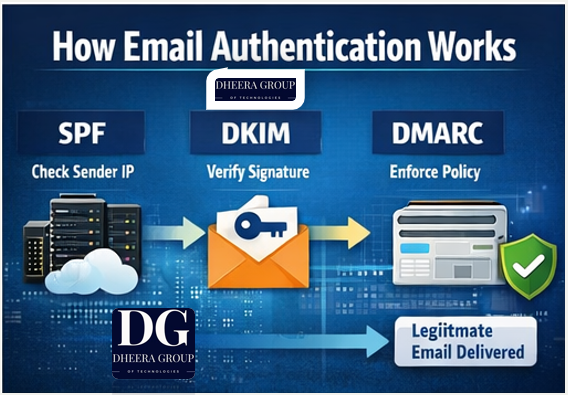
Without proper authentication, receiving mail servers cannot easily verify whether the email is genuine or fake.
What is SPF (Sender Policy Framework)?
SPF is a DNS record that specifies which mail servers are allowed to send emails on behalf of your domain. When a receiving server gets your email, it checks your SPF record to confirm the sender is authorized.
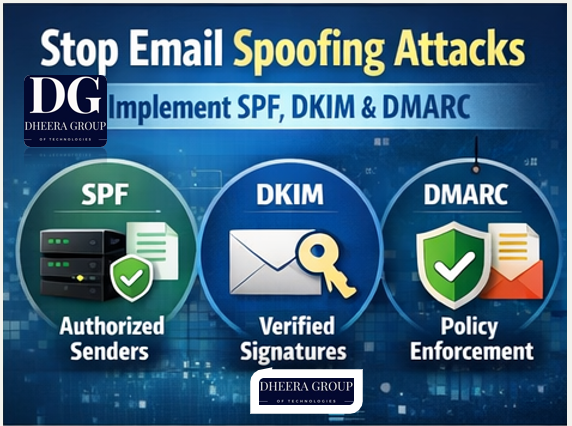
Benefits of Protect Your Domain from Spoofing
- Prevents unauthorized servers from sending emails using your domain
- Improves email deliverability
- Reduces spam and spoofing risks
- Helps protect your sender reputation
Example SPF Record
v=spf1 ip4:192.168.1.10 include:mail.yourdomain.com -all
This record tells receiving servers that only the listed IP address and included servers can send emails for your domain.
What is DKIM (DomainKeys Identified Mail)?
DKIM adds a digital signature to your outgoing emails. This signature is encrypted and stored in your DNS records. When the email reaches the recipient, their mail server checks the signature to ensure the message was not altered and that it came from an authorized server.
Benefits of DKIM
- Verifies email authenticity
- Prevents message tampering
- Improves inbox placement
- Builds trust with email providers like Gmail and Outlook
DKIM works using two keys:
- Private key — stored securely on your SMTP server
- Public key — published in your DNS
What is DMARC (Domain-based Message Authentication, Reporting, and Conformance)?
DMARC builds on SPF and DKIM. It tells receiving servers what to do if authentication fails and provides reports about email activity.
DMARC policies include:
- None — Monitor emails without blocking
- Quarantine — Send suspicious emails to spam
- Reject — Block unauthorized emails completely
Example DMARC Record
v=DMARC1; p=reject; rua=mailto:reports@yourdomain.com
This policy rejects unauthorized emails and sends reports to your email address.
How SPF, DKIM, and DMARC Work Together
These three protocols work as a complete authentication system:
- SPF verifies the sending server
- DKIM verifies message integrity and authenticity
- DMARC enforces policy and provides reporting
When all three are properly configured, receiving servers trust your emails more, improving deliverability and security.
Steps to Set Up SPF, DKIM, and DMARC
1. Access Your Domain DNS
Log in to your domain registrar or DNS hosting provider and open DNS management.
2. Add SPF Record
Create a TXT record with your authorized sending IP addresses and mail services.
3. Enable DKIM on Your SMTP Server
Generate DKIM keys from your mail server or email software and add the public key to DNS.
4. Create a DMARC Record
Start with monitoring mode:
v=DMARC1; p=none; rua=mailto:reports@yourdomain.comLater, switch to quarantine or reject for full protection.
5. Test Your Configuration
Use tools like Gmail headers or online email testing tools to confirm SPF, DKIM, and DMARC are working correctly.
Benefits for Businesses Using SMTP Servers
Implementing these authentication protocols provides several business advantages:
- Protects your brand from phishing attacks
- Improves email delivery rates
- Prevents emails from going to spam
- Increases customer trust
- Strengthens your sender reputation
- Ensures compliance with major email providers
This is especially important for businesses sending bulk emails, marketing campaigns, or transactional emails through SMTP servers or platforms like PowerMTA.
Common Mistakes to Avoid
- Missing SPF record
- Incorrect IP addresses in SPF
- DKIM not enabled on the mail server
- DMARC policy set incorrectly
- Multiple conflicting SPF records
Proper configuration ensures maximum protection and deliverability.
Conclusion
Email Services spoofing can seriously harm your business, but implementing SPF, DKIM, and DMARC provides strong protection. These authentication methods verify your SMTP server, protect your domain, and improve email deliverability.
By setting up SPF, DKIM, and DMARC correctly, you ensure your emails reach inboxes safely while protecting your brand from fraud and abuse. Every business using email marketing or SMTP servers should implement these essential security protocols to maintain trust and reliability.


Comments
Post a Comment